The Brother MFC-J470DW uses both dye-based and pigment-based inks:
- Black Cartridge (LC101BK / LC103BK): Pigment-Based Ink — Engineered for razor-sharp, waterproof, and smudge-resistant text documents.
- Color Cartridges (Cyan, Magenta, Yellow): Dye-Based Ink — Formulated for vibrant color saturation, smooth gradients, and reliable photo printing.
The Brother MFC-J470DW utilizes a Hybrid Ink System. From a professional printing consumables manufacturer’s perspective, understanding this dual chemical architecture is paramount. Matching the precise ink formula—pigment for black and dye for colors—is critical when selecting aftermarket (third-party) refills to ensure color accuracy, prevent chemical cross-contamination, and avoid severe Piezoelectric printhead clogging.
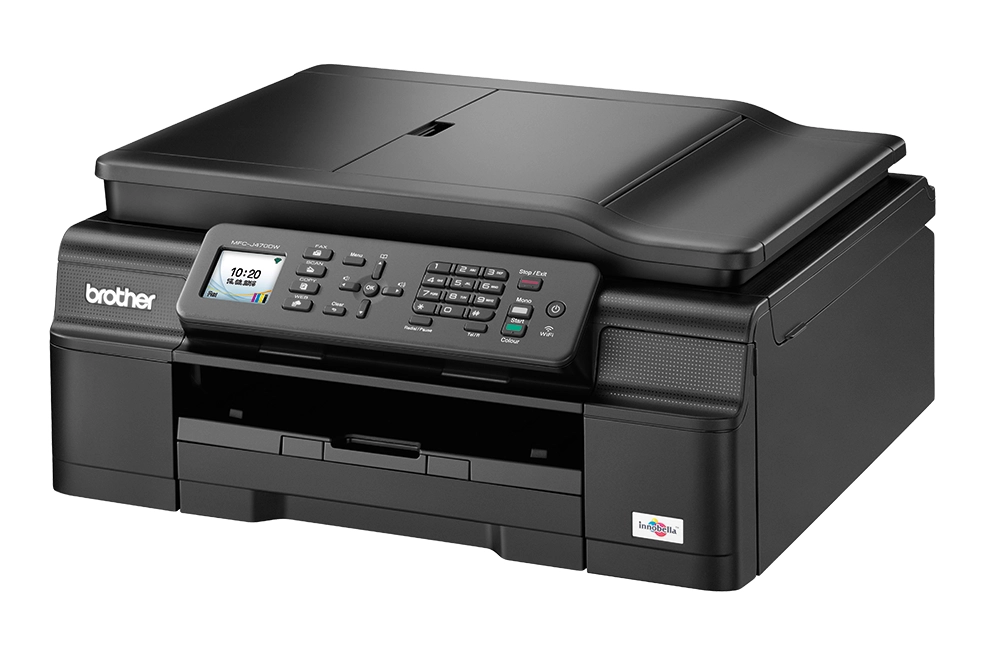
Why Brother Designed the MFC-J470DW with a Hybrid Ink System
Brother engineered the MFC-J470DW with a hybrid ink configuration to balance crisp document output with rich graphic rendering. However, because pigment and dye inks possess fundamentally different physical and chemical properties—such as particle suspension versus liquid solubility—using the wrong aftermarket ink formula can permanently damage your printhead micro-nozzles. Below, we break down how this hybrid setup works and how to select compatible inks safely to extend your printer’s service life.
1. The Engineering Concept: Pigment Black & Dye Color
The choice to pair a Pigment Black channel with Dye-based Color channels comes down to the underlying chemistry of ink absorption on paper:
Why Pigment Black (LC101BK / LC103BK)?
Unlike dye molecules that absorb deeply into paper, pigment ink consists of microscopic solid color particles suspended in a liquid carrier. When sprayed onto standard copy paper, these particles sit directly on top of the paper fibers without bleeding or feathering. This yields pitch-black, razor-sharp text that is inherently water-resistant, smudge-proof, and highlighter-friendly—essential technical qualities for printing professional business forms, invoices, and legal contracts.
Why Dye Colors (Cyan, Magenta, Yellow)?
Color printing requires seamless shade mixing and smooth tonal gradients. Dye inks are completely water-soluble, meaning the color colorants are dissolved down to the molecular level. When fired through Brother’s precise Piezoelectric printhead nozzles, dye droplets blend smoothly together without leaving particle grain. This delivers vibrant color saturation, fast drying times, and vivid photo or chart rendering without clogging the delicate color channels.
2. The Legacy Challenge: The OEM Cartridge Dilemma
While the MFC-J470DW’s hybrid setup delivers excellent versatile printing, owners today face a significant supply-chain hurdle: the machine is a legacy model.
- Scarcity & Price Hikes: Official OEM Brother cartridges—specifically the LC101 (standard yield) and LC103 (high yield) series—are increasingly difficult to source. Official distributors are phasing them out, leading to frequent out-of-stock notices.
- The Cost Asymmetry: When OEM cartridges are available from third-party resellers, price gouging often inflates a full set of genuine LC103 cartridges to a cost that exceeds the current secondhand market value of the printer itself.
This creates a dilemma for users who still rely on this durable workhorse. Replacing the printer feels wasteful, yet buying overpriced OEM ink is economically unfeasible. As a result, transitioning to high-quality, aftermarket compatible inks or refill systems has become the standard path forward—provided you choose formulas engineered specifically to match Brother’s pigment/dye requirements.
Use Compatible Inks or Refill Kits on MFC-J470DW
Transitioning away from hard-to-find OEM cartridges is completely safe for the Brother MFC-J470DW. Utilizing pre-filled aftermarket LC101/LC103 cartridges, transparent refillable cartridge shells, or Continuous Ink Supply Systems (CISS) is the most cost-effective solution to keep this workhorse operating without breaking the bank.
However, because Brother utilizes sensitive Piezoelectric printhead technology, you cannot simply pour any cheap ink into the machine. Extending the service life of an aging printer requires strict adherence to ink chemistry.
Critical Chemical & Physical Rules for Aftermarket Inks
When selecting third-party bulk inks or compatible cartridges, keep these three formulation rules in mind to protect your printer hardware:
- Do NOT Mix Chemical Formulas Across Channels
Never pour pigment ink into the Cyan, Magenta, or Yellow color channels, nor should you use standard dye ink in the Black channel if you expect razor-sharp text. Color nozzles on the MFC-J470DW are micro-engineered exclusively for liquid dyes. Introducing pigment particles into color channels—or mixing pigment and dye residues together—triggers an instant chemical reaction, causing ink crystallization and permanent nozzle blockages.
- Mind the Viscosity & Surface Tension
Aging Piezo printheads suffer from subtle physical wear over time, reducing their ability to push thick, sluggish liquids. Third-party inks must feature high-fluidity and precise surface tension tailored to Brother’s voltage pulses. If an ink’s viscosity is too high, the printhead will experience firing delays, micro-banding, or severe starvation during high-speed document printing.
- Choose Dedicated Formulas Over “Universal” Inks
Beware of generic, ultra-cheap “Universal Ink for All Printers.” Canon, Epson, and Brother printheads operate at entirely different internal temperatures, pH balances, and chemical compatibility thresholds. Brother printheads require a specific pH range to prevent internal corrosion and active dispersants to keep black pigment particles uniformly suspended. Always opt for formulas engineered specifically for Brother LC101/LC103 series.
💡 Pro Tip for Ink Selection: To dive deeper into Brother’s broader ink chemistry across different series and understand how their printheads handle different formulations, read our in-depth guide on is Brother ink pigment or dye.
Maintenance & Cleaning Guide for Aging Brother Printheads
Because the Brother MFC-J470DW is a legacy model, many units currently in service have experienced periods of prolonged inactivity. When an inkjet printer sits idle for weeks or months, the liquid carriers in the ink evaporate, leaving behind stubborn, dried ink residue inside the microscopic channels of the Piezoelectric printhead.
However, a clogged printhead doesn’t mean your machine is ready for the landfill. Because this printer uses a hybrid ink system, resolving a clog requires a tailored approach based on whether the issue is in the Pigment Black or Dye Color channels.
Step-by-Step Clog Revival: Pigment vs Dye Channels
Before initiating manual cleaning, always refer to the official Brother MFC-J470DW User Manual & Maintenance Guides to run built-in software nozzle cleaning cycles first. If standard cleaning cycles fail to clear missing lines, follow these specialized restoration steps:
1. Restoring the Black Channel (Pigment Ink Clogs)
- The Technical Challenge: Dried pigment ink forms hard, insoluble microscopic carbon crusts that standard water or mild alcohol cannot dissolve.
- The Solution: Use a specialized Pigment Cleaning Flush containing active dispersants and surfactant agents.
- Action Steps: Gently inject 2–3 ml of warm pigment flush solution into the black ink intake port using a syringe attached to a soft silicone tube. Allow the solution to soak for 15–30 minutes to break down the carbon micro-particles before drawing it back or running a forced purge cycle.
2. Restoring the Color Channels (Dye Ink Clogs)
- The Technical Challenge: Dye ink residue consists of dried water-soluble colorants, which are much easier to re-hydrate.
- The Solution: A gentle, warm water-based cleaning solution (or distilled water with a drop of isopropyl alcohol) works effectively without damaging delicate nozzle membranes.
- Action Steps: Flush warm dye cleaning fluid gently through the Cyan, Magenta, or Yellow ink ports. Avoid excessive pressure to prevent rupturing the internal Piezo seals.
Winnerjet Tip: Keep the Piezo Channels Flowing
The single best way to avoid printhead drying on an aging Brother printer is routine movement:
💡 Prevention Rule: Print a single 4-color test page or run a printhead nozzle check at least once every 7 to 10 days. This keeps liquid ink continuously flowing through the micro-nozzles, preventing air pockets from forming and stopping ink from drying inside the Piezo channels.
Your One-Stop Printing Consumables Manufacturer
Selecting the right ink manufacturer is critical to protecting printhead lifespan and ensuring long-term color consistency—whether for legacy desktop printers or industrial digital production lines.
As a leading ink chemistry manufacturer, Winnerjet delivers factory-direct reliability backed by nearly two decades of industry experience:
20+ Years of Manufacturing Expertise: Our R&D team formulates inks with strict micro-filtration (under 0.2 microns) and precise viscosity control to prevent micro-clogging and misfires.
Full Industrial Spectrum: We supply a complete range of digital printing consumables—including high-grade DTF powder, film, UV inks, and sublimation solutions. For industrial garment printing, explore our high-density Winnerjet GTX ink and wash-durable Winnerjet DTG ink formulations.
Factory-Direct B2B Value: Benefit from wholesale pricing, custom OEM/ODM ink formulation (viscosity, pH, and ICC color profiling), and turnkey technical support to maximize your operational efficiency.
FAQS – Brother MFC-J470DW
Can I convert my old Brother MFC-J470DW into a Sublimation printer?
No, you cannot reliably or practically convert this model into a sublimation printer. While Brother uses Piezoelectric printhead technology, the MFC-J470DW lacks reliable aftermarket chip resetters, stable CISS support, and dedicated sublimation ICC color profiles required for accurate color transfer. Attempting conversion will result in constant cartridge recognition errors, severe color casting, and permanent printhead clogging. For sublimation, Epson EcoTank printers remain the industry-standard choice.
How do I know if my replacement Black ink is true Pigment ink?
Which ink cartridges are compatible with the Brother MFC-J470DW?
What happens if I use Dye ink in the Black channel or Pigment ink in the Color channels?
Can I mix third-party replacement ink with original Brother ink in the same printer?
Conclusion & Get Tailored Ink Solutions Today
The Brother MFC-J470DW remains a classic, highly reliable workhorse, but its unique Pigment Black + Dye Color hybrid system demands precise ink chemistry to prevent premature printhead failure. Understanding this distinction is essential whether you are maintaining an aging desktop unit or managing large-scale printing operations.
At Winnerjet, we believe that long-term printing consistency stems from strict chemical formulation and micro-filtration standards. Whether you need custom compatible inks for legacy desktop models or high-performance industrial DTG, DTF, UV, and sublimation solutions, we deliver factory-direct quality backed by dedicated engineering support.
Ready to optimize your printing performance or explore competitive B2B wholesale options? Share your print requirements with us—Contact Us today for factory-direct pricing and custom ink formulation consultations.