DTF transfers are a fast, easy way to print colorful designs on fabric. In this guide, you’ll learn how to apply DTF transfers to T-shirts step by step—even if you’ve never done it before.
🧰 What You’ll Need
Get these tools ready before you start:
- DTF Transfer Film (pre-printed or your design)
- DTF Powder
- Heat Press Machine
- Lint Roller
- A T-shirt (cotton, polyester, or blend)
👉 Good to know: DTF works on both dark and light shirts. No pre-treatment is needed!

🧰 How to Apply DTF Transfers (Step-by-Step)
Prefer a visual walkthrough? Watch our step-by-step video above or follow the quick timestamp breakdown below:
Follow these simple steps to press your design onto the shirt:
Step 1: Preheat the Press
- Set your heat press machine to 160–170°C (320–338°F).
- Adjust the press to medium to firm pressure.
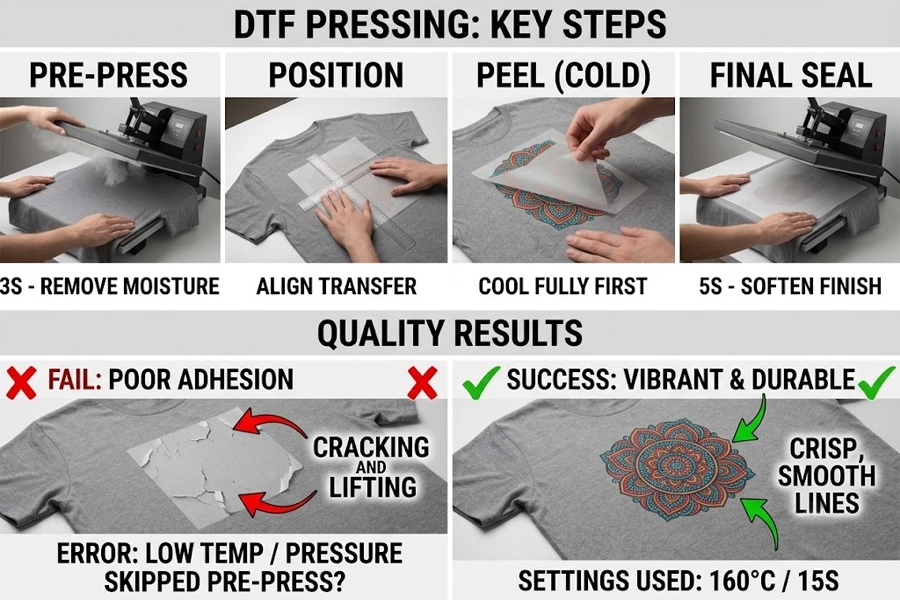
Step 2: Pre-Press the Garment (Crucial Step!)
- Lay your t-shirt flat on the heat press and roll off any lint with a lint roller.
- Press the plain t-shirt for 3–5 seconds WITHOUT any film.
- Why this matters: Pre-pressing removes hidden fabric moisture and wrinkles. Trapped moisture is the #1 reason DTF transfers fail to stick or peel off after washing!
Step 3: Position the DTF Transfer
- Place your DTF transfer film on the shirt with the design facing down (the white adhesive side touches the fabric, and the clear film faces up).
Step 4: Press the Design
- Close the heat press and press for 10–15 seconds.
Step 5: Peel the Film (Hot vs. Cold Peel)
- Peel off the carrier film smoothly based on your film type (see Hot vs. Cold Peel tips below).
- If any edges lift, press again for 5 seconds before peeling.
Step 6: Final Seal Press (Recommended)
- Cover the exposed print with parchment paper or a Teflon sheet.
- Press again for 5–10 seconds. This locks the design deep into the fabric for extra durability and a smoother feel.
Hot Peel vs Cold Peel: Which One Do You Have?
One of the most common mistakes beginners make is peeling the film at the wrong temperature. Always check your film specifications:
Hot Peel Film: Peel off immediately (within 1–3 seconds) right after opening the heat press while the film is still hot. This speeds up high-volume production.
Cold Peel Film: Allow the t-shirt and film to cool down completely to room temperature before peeling. Peeling too early will tear the design!
Winnerjet Tip: If you aren’t sure which film you have, always start with a Cold Peel—it is the safest route for all film types.
🧪 Tips for Better Results
- Do a test shirt before large jobs
- Use good-quality DTF film and powder
- Avoid pressing too long—it can damage the design
- Make sure heat and pressure are even
🏆 What do you need to prepare for DTF transfer?
Get these tools ready before you start:
DTF Printer – clear and bright prints
DTF Heat Press Machine: A flatbed heat press with adjustable pressure settings.
DTF Transfer Film: Pre-printed or custom-printed film. (Tip: For vibrant colors and smooth peeling, choose premium films like Winnerjet DTF Transfer Films).
DTF Powder & Inks: Premium hot-melt powder and fast-drying inks for flexible, durable prints.
Lint Roller: Essential for cleaning dust and loose fibers from fabric.
T-Shirt: Cotton, polyester, or blended fabric (no pre-treatment needed!).
Teflon Sheet or Parchment Paper: For the final protective press.
🛡️ Certified by SGS & RoHS. Trusted by customers in Europe, the US, and more.
Pro Tip on Consumables and Print Quality
The key to a long-lasting, crack-free print lies in using smooth-flowing ink and stable carrier film. If you experience inconsistent peeling, color fading, or nozzle clogging, switching to certified, high-density supplies like Winnerjet DTF Inks & Films ensures reliable performance, soft hand-feel, and excellent wash durability across all garment types.
🎯 Ready to Upgrade Your DTF Printing Quality?
Whether you are running a home craft setup or managing a high-volume apparel printing business, reliable printing supplies make all the difference in final print quality and customer satisfaction.
Winnerjet provides professional DTF solutions—including continuous film rolls, fast-drying inks, and high-strength adhesive powders—trusted by print professionals across Europe, the US, and worldwide.
- Testing new films or inks? Request a Free DTF Sample Pack
- Troubleshooting your heat press setup? Contact Our DTF Specialists
- Need bulk shop pricing? Get an Instant Wholesale Quote
🧠 FAQs
1. Can I use a household iron or Cricut EasyPress instead of a heat press?
While a dedicated heat press yields the most durable commercial results, here is how other tools perform:
Household Irons: Not recommended. Irons lack uniform heat distribution and cannot provide consistent downward pressure, which causes designs to peel off after a few washes.
Cricut EasyPress: Possible for small DIY projects. Since EasyPress lacks a mechanical clamp, you must apply heavy manual pressure (push down firmly with both hands) for 15–20 seconds and ensure equal heat coverage across the transfer area.
2. What’s the best temperature for DTF transfers?
Between 160–170°C (320–338°F) is ideal.
3. Why won’t my design stick?
Check your temperature, pressure, and powder. They all matter.
4. Do I need to press it twice?
Yes. The second press helps the print stay on longer.
5. What fabrics can I use?
DTF works on cotton, polyester, blends—even some nylons.
6. Can I wash the shirt normally?
Yes, but wait 24 hours. Wash inside out with cold water.
7. How long do DTF prints last?
With care, they last over 50 washes.
8. Can I reuse the film?
No. Each film is for one-time use only.