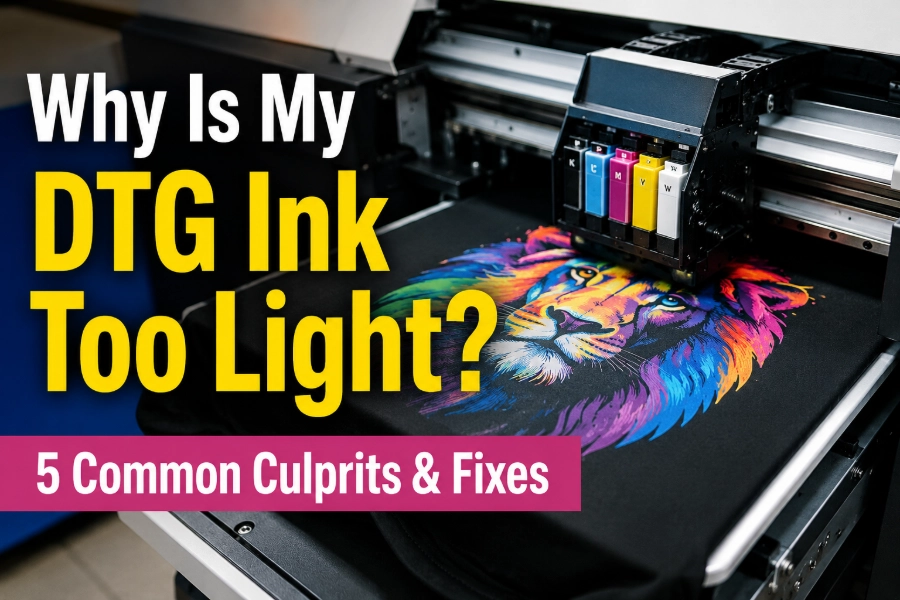
Imagine this: your printheads are running perfectly, but the finished garment looks dull, faded, and completely lifeless. If you are struggling with the frustrating question, “Why is my DTG ink too light?” you are definitely not alone.
The good news is your ink isn’t ruined. Faded DTG prints are usually caused by a single miscalibrated variable in your production line. Backed by nearly 20 years of digital imaging R&D and manufacturing expertise, our technical team has compiled this definitive DTG troubleshooting guide. Below, we will target the 5 core culprits and show you exactly how to make DTG prints brighter.
II. Quick Troubleshooting Matrix
Before diving into the details, you can use this matrix to quickly diagnose your exact issue and apply a 1-minute solution.
| Culprit (5 Common Causes) | Symptom (What You See) | Fix (1-Minute Solution) |
|---|---|---|
| 1 RIP Software Restrictions | Colors look faint, but the white ink base appears thick and bright. | Increase the CMYK ink density percentage in your RIP software; perform a nozzle cleaning. |
| 2 Insufficient or Wet Pretreatment | The entire print (including white) looks dull and sinks directly into the fabric fibers. | Increase the pretreatment spray weight (grams); ensure the fabric is completely dry before pressing and printing. |
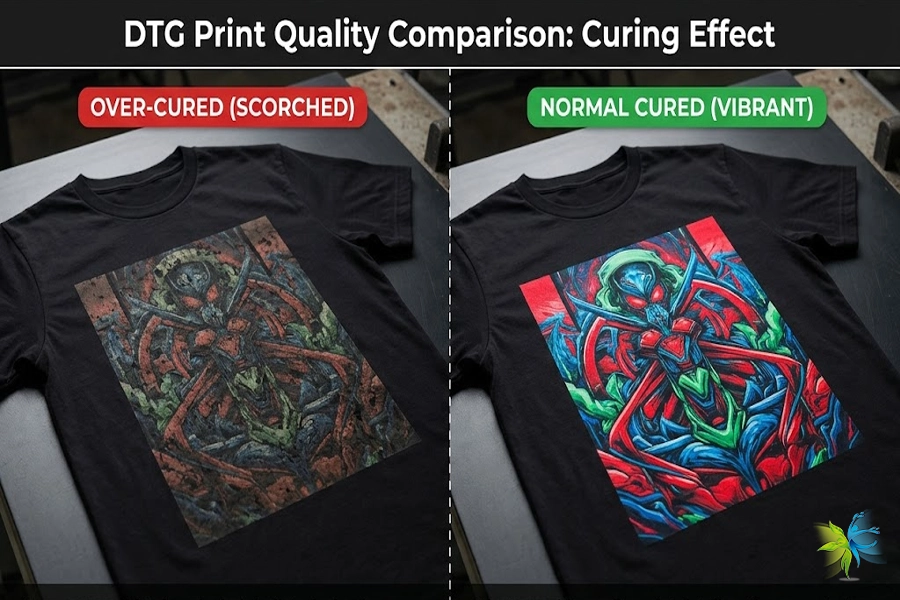
| 3 Improper Heat Press Curing | Vibrant immediately after printing, but fades drastically across large areas after heat pressing or washing. | Calibrate the actual heat press temperature with a temperature gun; adjust curing time to prevent high-temperature scorching. |
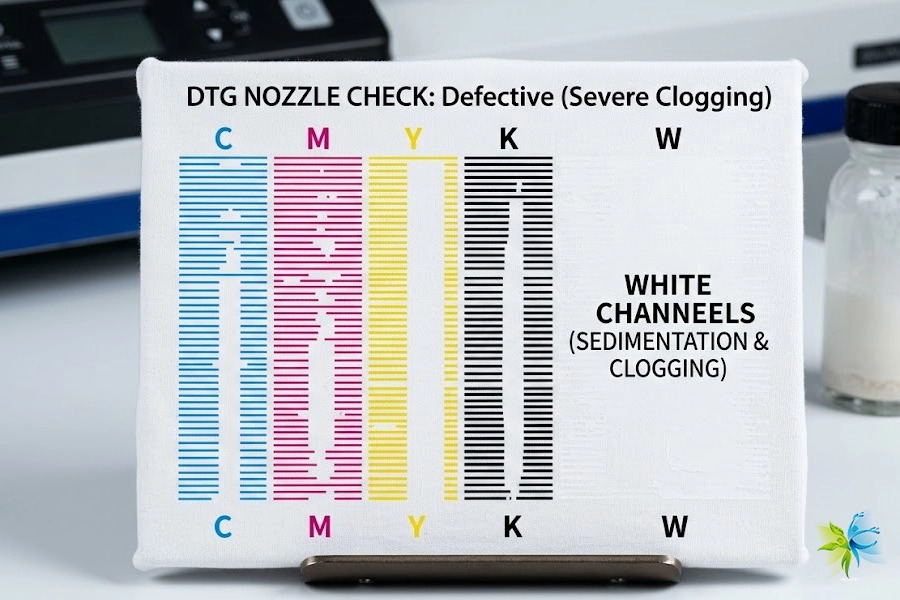
| 4 Uneven Spraying or Nozzle Clogs | The pattern looks patchy, uneven in color, or has a flaky white appearance. | Print a nozzle check pattern and clean the printhead; switching to an automatic pretreatment machine is highly recommended. |
| 5 Climate & Fabric Mismatch | Bleeding or banding in high-temp/humidity areas (SEA/South Asia); poor vibrancy on low-grade cotton (Africa). | Adjust ink waveforms or control workshop climate for tropical zones; select high-CPO universal inks for the African market. |
III. Deep Dive: The 5 Culprits Behind Light DTG Ink
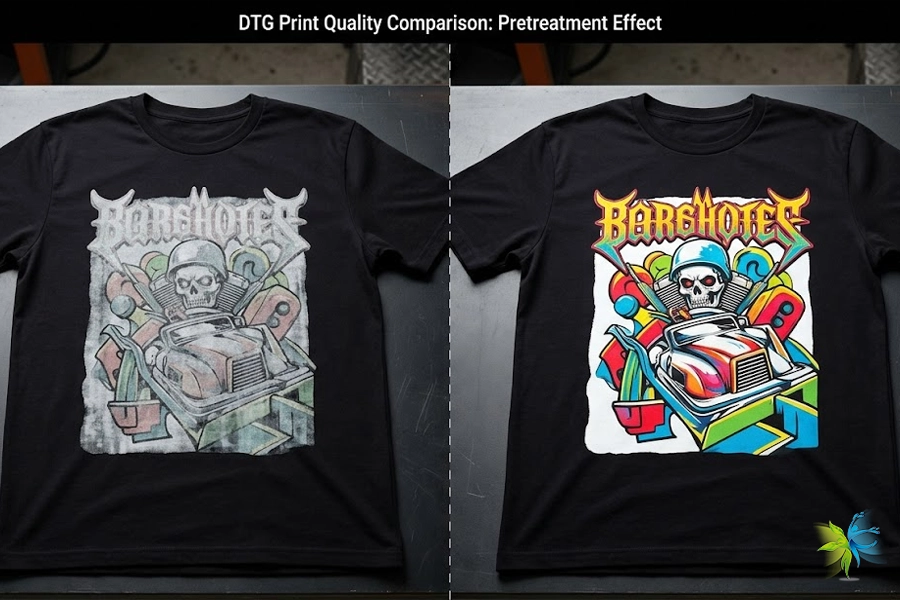
1. Pretreatment Misapplication: Missing the Sweet Spot
The chemical curing principle of water-based DTG pigment inks (especially white ink) is similar to “acid meeting glue to flash-coagulate.” Pretreatment acts as a primer barrier that keeps the ink suspended on the fabric surface, preventing it from sinking into the fiber core.
Common Mistakes:
Under-application: Ink bleeds straight into the back of the shirt, leaving a pale, faint front design.
Uneven Spraying: A notorious byproduct of manual spray bottles, causing patchy, mottled prints.
Improper Moisture Levels: Printing on wet pretreatment causes the ink to bleed, blur, and look fuzzy.
Control application weight precisely based on fabric GSM (e.g., dark garments require 20–25g of pretreatment fluid). Utilizing automated pretreatment equipment is highly recommended.
A printing shop located in Manila, Philippines, processed a batch of heavyweight 100% cotton hoodies using manual spray bottles, resulting in finished prints that came out dull and patchy across large areas. After our technical personnel stepped in, they discovered that because the fabric was so thick, the manual spraying was extremely uneven and the fluid amount was severely insufficient. After switching to an automatic pretreatment machine and locking the application weight at a stable 24g, the color saturation of the prints normalized instantly.
Welcome to consult our technical experts for an in-depth industry discussion on how to properly calculate the exact DTG pretreatment fluid spray weight for different fabrics.
2. Heat Press Curing Variables Run Amok
Exceeding temperatures of 180°C or pressing for too long chemically degrades the water-based resins and organic pigments, roasting the colors until they turn dark and muddy.
Low temperatures or weak pressure prevent the ink from cross-linking properly with the pretreatment and fabric fibers. While the design looks vibrant right off the print tray, the ink washes away and fades drastically after a single rub or wash cycle.
Aging heat presses often have faulty built-in temperature probes—the display might read 165°C when the heating plate is actually sitting at 140°C or spiking up to 190°C.
A client running a custom apparel store in Cape Town, South Africa, noticed that their prints looked incredibly vibrant when pulled from the platter, but faded by 40% after the customer washed them just once. We guided the customer to use an infrared temperature gun to test the machine, and they discovered a 25°C temperature variance on the left side of their 5-year-old heat press plate, which was causing severe under-curing on that side.
How do you use an infrared temperature gun to calibrate an aging heat press? Ensure your curing parameters never fail you—contact our technical experts.
3. Fabric Composition Limitations (The Carrier Problem)
Standard DTG inks are engineered specifically for 100% Cotton. Printing on polyester, nylon, or low-percentage blends (like 50/50 CVC) will cause your colors to drop drastically.
Certain garments are treated with heavy silicone softeners or water-repellent coatings at the mill. These chemicals actively repel both the pretreatment fluid and the ink, leading to terrible ink adhesion and a very faint output.
One of our clients, an e-commerce seller, sourced a batch of cheap blend hoodies from an open wholesale market for DTG production. Because the polyester content was too high and the surface was treated with heavy silicone softeners, the water-based ink could not adhere, leaving a pale, translucent color layer. We recommended switching to combed ringspun 100% cotton blanks, which completely resolved the color issue.
Visit our fabric selection zone or consult with us regarding our customized DTG inks to minimize fabric-related limitations, elevate your finished products, and ensure long-lasting color durability.
4. RIP Software Settings & ICC Profile Mismatches
Check the white ink and color layer output percentages inside your RIP software (such as Digital Factory). Software settings often default to an “economy mode” to save ink, which chokes the maximum ink density.
Different fabrics and different ink brands require specialized ICC color profiles. Directly copying a default profile can lead to inaccurate CMYK color mixing, a narrowed color gamut, and faint tones.
If your digital print factory notices that bulk production reds and blues look severely grey and light after switching consumables, it is usually because the operator applied a generic profile meant for old inks. We recommend reloading the factory-optimized, dedicated ICC color profile and restoring the ink output volume, which will immediately bring back rich, sharp, and saturated colors.
Click here to source customized DTG inks and receive your optimized ICC color profiles completely free of charge.
5. Hardware Maintenance: White Ink Sedimentation & Clogged Channels
DTG white ink contains heavy TiO2 molecules for maximum opacity, which settle quickly. If left sitting for a few days without manual agitation or an automated circulation sequence, the white base becomes thin and watery, failing to support the colored ink layer printed on top.
Lint, dust, or micro-crusts on the printhead surface can cause deflected sprays. Even if the ink appears to be flowing, the actual picoliter droplet volume shrinks, reducing color coverage across the design.
A workshop restarted their production line after a 4-day holiday weekend without shaking the ink dampers or running a deep cleaning sequence. The first 20 shirts turned out semi-transparent and extremely faint because the Titanium Dioxide in the white ink had separated, making the base layer too thin. Running a white ink circulation cycle and cleaning the channels completely restored the opacity and color saturation.
Master your hardware maintenance. Check out our factory logs for daily maintenance steps for DTG white ink circulation systems and quick flushing techniques for deflected nozzles.
IV. Advanced Tips: How to Make Your DTG Prints Significantly Brighter
1. Master Your Workshop’s Temperature and Humidity
The Standard: Maintain a strict workshop environment of 20–25°C (68–77°F) and a relative humidity level of 50%–70%.
The Risk: When the printing environment is too dry, water-based digital inks experience micro-crusting on the printhead nozzle plate. This restricts the exact picoliter droplet volume, leading to faint colors, mid-print nozzle drops, or banding lines.
To join ongoing environmental maintenance discussions with front-line operators regarding wet, tropical climates or extreme dry zones, visit the Reddit r/dtg Community Page.
2. Leverage RIP Software “Double Strike” Strategies
The Technique: For high-end client orders requiring retail-grade vibrancy, enable the “Double Strike” (Double Print) or double white underbase feature in your RIP software (such as Digital Factory).
How it Works: This lays down a dual-layered white underbase or a secondary CMYK pass, increasing ink film thickness and solid coverage. This ensures your graphics pop with a vibrant, three-dimensional finish on dark garments or coarse fabric textures.
To see how mature global printing factories fine-tune underbase parameters for different RIP software brands, check out the technical sections on the T-Shirt Forums Home Page.
V. Beyond Troubleshooting: Is It Time to Upgrade Your Consumables?
If you have systematically calibrated your pretreatment weights, verified your heat press temperatures with a thermal gun, and maximized your software ink volume, yet your prints still look faint and pale, the culprit is highly likely the ink itself. Low-grade consumables suffer from poorly milled pigments and low solid content, leaving them incapable of delivering strong hiding power.
At this stage, professional buyers and global distributors re-evaluate their supply chain using three critical criteria:
High Solid Content & Nano-Filtration: Sourcing inks formulated with high-purity Titanium Dioxide for the white base, ensuring a dense underbase that perfectly anchors the CMYK layers.
International Eco-Certifications: Guaranteeing that your garment exports satisfy strict global buyer compliance by sourcing inks certified under the official OEKO-TEX Standard 100 Criteria or the GOTS (Global Organic Textile Standard).
Supply Chain Risk Management: Evaluating whether your supplier provides factory-direct wholesale volumes or structured programs to hedge against global raw material and ocean freight volatility (such as advanced “Pre-pay & Lock” inventory programs) to minimize your Total Cost of Ownership (TCO).
🧪 Stop Letting Poor Consumables Drain Your Profits: Take control of your color quality today. Contact our senior technical consultants for a free remote color profile (ICC) diagnosis, or apply immediately to receive your free high-saturation DTG ink test samples!