Brother MFC-J895DW Ink Specification Matrix
| Ink Channel / Color | OEM Cartridge Code | Ink Formulation | Particle / Chemical Property | Key Print Characteristics | Primary Media |
|---|---|---|---|---|---|
| Black (BK) | LC3011BK / LC3013BK | Pigment Ink | Micro-particle dispersion; sits on paper fibers | Waterproof, smudge-proof, laser-like text clarity | Plain copy paper, standard office bond, envelopes |
| Cyan (C) | LC3011C / LC3013C | Dye Ink | Fully dissolved molecular solution | High brightness, wide color gamut, smooth gradient | Glossy photo paper, inkjet presentation paper, matte brochure paper |
| Magenta (M) | LC3011M / LC3013M | Dye Ink | Fully dissolved molecular solution | Vivid tonal rendition, deep saturation | Photo paper, treated inkjet media |
| Yellow (Y) | LC3011Y / LC3013Y | Dye Ink | Fully dissolved molecular solution | Clean highlight blending, zero bronzing | Glossy paper, everyday graphics |
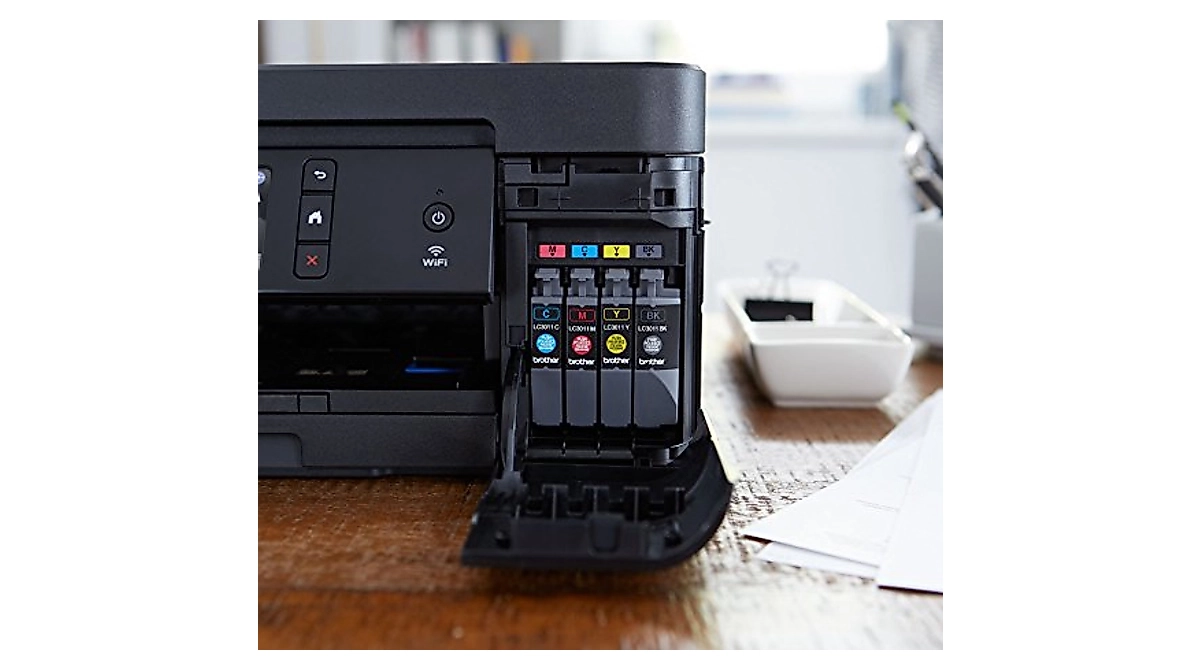
Design Principles of the Brother MFC-J895DW Hybrid Ink System
As documented in the official Brother MFC-J895DW Support Specifications, this 4-in-1 machine is engineered with Brother’s precision micro-piezoelectric printhead (up to 6000 × 1200 dpi). To balance business documentation with high-resolution photo output, Brother uses a hybrid ink delivery system:
- Black Uses Pigment Ink (LC3011BK / LC3013BK): Pigment particles sit directly on top of plain paper fibers rather than absorbing deeply. This produces crisp, laser-sharp text edges that are immediately smudge-resistant, waterproof, and safe from highlighter bleeding.
- Colors Use Dye Ink (LC3011 / LC3013 C/M/Y): Dye colorants are 100% water-soluble molecules with zero solid particulates. They flow smoothly through the ultra-fine color nozzles without clogging risks, fully penetrating glossy photo coatings for deep color saturation and bronzing-free image reproduction.
- The Combined Printing Effect (Hybrid Output): When printing complex documents with both text and color visuals (such as business reports, presentations, and brochures), the printer applies both inks in tandem. The pigment black ensures all headings, body copy, and fine lines remain bold and razor-sharp, while the dye colors deliver vibrant charts, graphics, and smooth photo gradations on the same page without color bleeding or muddy transitions.
Exploring ink options across different Brother printer lines? Check our detailed guide on which Brother printers take dye or pigment ink for full cross-series compatibility.
The Big Risk: What Happens If You Mix or Misuse Inks?
As the Brother MFC-J895DW enters the stage of its installed base characterized by the late phase of its product lifecycle—approaching maturity and discontinuation…
The Brother MFC-J895DW factory setup uses a hybrid configuration: Pigment Black (LC3011BK/LC3013BK) and Dye Colors (LC3011/LC3013 C/M/Y). As users look for cheaper aftermarket supplies, altering this original balance or mixing formulations leads to the most common printhead failures.
Chemical Precipitation from Misuse: Pigment black relies on suspended solid carbon particles, while color inks are dissolved water-soluble dyes. Pouring dye ink into a black pigment cartridge (or vice versa) triggers pigment agglomeration—the contrasting chemicals cause particles to clump into microscopic sludge that permanently clogs Brother’s 1.5–2.0 picoliter nozzles.
The Mixing Rule:Never cross-mix ink brands or change formulations in the same channel without flushing. When switching from OEM hybrid to third-party inks, replace the whole cartridge and run 1–2 cleaning cycles to clear residual fluid.
Third-Party Dilemma vs Factory Hybrid:
- All-Dye Cartridge Sets: Replacing the factory pigment black with dye black reduces clogging risk and cost, but text loses all water and highlighter resistance.
- All-Pigment Cartridge Sets: Replacing the factory dye colors with pigment colors provides full water resistance, but dulls glossy photo prints and risks starving the ultra-fine color nozzles.
Fixing Clogs: If mixed ink causes banding, avoid endless automatic cleanings (which quickly flood the waste pad). Use a dedicated piezo printhead cleaning solution to dissolve deposits safely.
Refilling & Third-Party Cartridges: Practical Setup & Chip Tips
Using compatible replacement cartridges or refillable ink systems (CISS/Refillable Cartridges) on the Brother MFC-J895DW can significantly lower running costs. To prevent errors and ink starvation, follow these essential hardware, chip, and refill practices.
Dual Recognition Mechanism: Smart Chips & Optical Sensors
The Brother MFC-J895DW uses a two-stage detection system to verify cartridges:
- The Smart Microchip: Located on the cartridge body, this chip authenticates cartridge presence and stores algorithmic page-yield estimates. If the printer displays
"Cannot Detect", gently clean the copper contact pins with an alcohol wipe and ensure the cartridge is pushed firmly until it clicks into place. - The Optical Prism Sensor: The printer uses an internal infrared light beam to read the transparent mechanical prism at the front of the cartridge. Even if the chip is valid, if the optical prism is blocked or deformed, the printer will report the cartridge as empty.
Firmware Protection: Avoid Third-Party Chip Lockouts
Printer manufacturers routinely issue background firmware updates that alter the chip handshake encryption, rendering existing third-party LC3011 and LC3013 chips unrecognizable.
- Disable Automatic Updates: On the MFC-J895DW touchscreen, navigate to Settings > All Settings > Initial Setup > Firmware Auto Check, and set it to Off.
- Driver Settings: When installing or updating Brother software on your PC or Mac, uncheck any prompts requesting permission to automatically download device firmware updates.
Refilling Best Practices: Air Vent & Pressure Management
Brother’s stationary ink bay relies on internal atmospheric pressure balance to feed ink smoothly through internal tubes to the moving printhead.
- Managing the Rubber Plugs: Refillable cartridges feature two distinct silicone ports:
- Ink Injection Port (Colored Plug): Remove only while refilling with a syringe, then seal tightly immediately after filling.
- Air Vent Port (Transparent/White Plug):Must be removed before installing into the printer. Leaving the air vent sealed creates a vacuum lock (negative pressure starvation), which stops ink flow and causes severe blank pages or banding within minutes.
- Volume Limits: Fill refillable cartridges to approximately 85%–90% capacity. Overfilling can cause excess ink to flood the optical sensor chamber and leak into the printer carriage.
Professional Ink Formulations & Factory-Direct Solutions
Selecting the correct ink requires strict adherence to fluid viscosity, surface tension, and particle filtration tailored to Brother’s piezoelectric printhead architecture. Winnerjet provides lab-tested, factory-direct bulk formulations and OEM manufacturing services that match original printing tolerances without high brand premiums.
OEM & Bulk Formulation Standards
- Precision Desktop Formulations: Our desktop ink lines are engineered to eliminate nozzle sedimentation and maintain smooth continuous ink delivery. For crisp, smudge-resistant monochrome business documents, choose our lab-formulated Winnerjet pigment ink. For wide-gamut photo output and streak-free everyday color graphics, utilize our high-purity Winnerjet dye ink.
- Bulk Packaging & Custom OEM Bottling: Available in standard 100ml, 250ml, 500ml, 1000ml bottles, and industrial drums, offering comprehensive OEM labeling, custom chip matching, and specialized viscosity tuning for distributors and refill shops worldwide.
Beyond Desktop: Industrial & Specialty Digital Printing
- Textile & Industrial Inks: Beyond standard desktop office systems, Winnerjet manufactures high-performance industrial textile consumables, including dedicated Winnerjet GTX ink designed for Brother direct-to-garment (DTG) printing systems.
- Full Product Range: Comprehensive solutions across Direct-to-Film (DTF powder, films, and inks), UV-curable inks, and dye-sublimation systems for commercial print houses.
One-Stop Manufacturing Support & Technical Consultation
- Manufacturing Experience: Backed by nearly two decades of consumables R&D, stringent three-stage micro-filtration (<0.2 μm), and annual production output exceeding 500 tons.
- Get in Touch: Need custom OEM bottling, bulk wholesale pricing, or technical troubleshooting for your specific printer fleet? Contact Us directly to speak with our application engineers.